


Important information:
Am 10. April 2024 wurden das Kundenportal sowie der Web-Zugriff auf das Kartenkonto eingestellt. Bitte laden Sie die Swiss Bankers App herunter, um weiterhin uneingeschränkten Zugriff auf alle Dienste zu haben.
Are you a Swiss Bankers sales partner?
Hier geht es zum Partnerportal.
Your smartphone vibrates. A notification prompts you to confirm a payment or login that you didn’t initiate yourself. You reject the request, but a few seconds later the next one appears. And then another. At some point, you just want the notifications to stop. This is exactly what fraudsters are banking on with what’s known as ‘push bombing’: by sending repeated authorisation requests, they try to trick you into confirming something without thinking. Find out how this scam works and how to react correctly when it matters most.
 25.11.2026
 Miryana
Push bombing is a scam in which criminals deliberately bombard their victims with repeated digital authorisation requests. Services that use multi-factor authentication (MFA) – for example, in the form of two-factor authentication – are particularly affected. With this method, a login must be confirmed via a smartphone app, for example, in addition to the password. Similar security procedures are also used for online payments.
Fraudsters have often already obtained login details or card details, for example through phishing, fake online shops or data breaches. However, an additional security prompt prevents them from completing their scheme.
Rather than technically bypassing this security measure, they attempt to wear down the victim by sending a constant stream of new authorisation requests. In doing so, they rely on frustration, fatigue and waning attention. A single careless confirmation can be enough to allow unauthorised access to an account or a payment to be made.
In some cases, criminals ramp up the pressure with a phone call in which they pose as bank staff and press for confirmation. You can find out more about such combined fraud attempts in our article ‘3D Secure fraud: recognising push phishing and code fraud’.

We unlock our smartphones, confirm logins, accept cookie notices and authorise online payments. Many of these actions have long since become routine.
In cyber security, the term ‘MFA fatigue’ – or authentication or verification fatigue – is used to describe the phenomenon where recurring security prompts lead to a decline in attention. Fraudsters exploit our familiarity with digital confirmations, everyday distractions and the growing frustration caused by constant interruptions.
What makes this particularly insidious is that, in push-bombing, the authorisation request does not necessarily have to be fake. It may actually come from your bank, your card provider or another trusted service. The logo is correct, the app is genuine and the security prompt looks exactly as it usually does. What is not right is the reason for the request.
The crucial question is therefore not just whether the notification is genuine, but above all: ‘Did I initiate this transaction myself?’
Bear in mind: a genuine security notification is not in itself proof that the transaction is legitimate.
Several authorisation requests within a short space of time, notifications in the middle of the night, or requests that keep reappearing despite being rejected: all of these can be signs of push bombing. However, even a single unexpected authorisation request should raise a red flag.
Before you tap ‘Confirm’, ask yourself these five questions:
Reason: Did I initiate this payment or registration myself?
Recipient: Do I recognise the merchant or the service in question?
Payment details: Do the amount and currency match for this payment?
Timing: Does the request fit with what I’m currently doing?
Freedom of choice: Am I confirming the request of my own free will and not because someone is pressuring me to do so?
If you cannot unequivocally answer ‘yes’ to any of these questions, do not authorise the transaction. If you are unsure, take sufficient time to check the details.
You can find further information in our article ‘Card security: protecting your card and authorising payments securely’.
Good to know: A transaction notification informs you of a card transaction. A payment authorisation, on the other hand, requires your consent to a payment transaction.
Don’t let repeated notifications put you under pressure. If you suspect a possible attempt at fraud, you should take the following steps:
Reject the request: Actively reject any unknown authorisation requests, where possible. Do not confirm any payment or login that you have not initiated yourself – regardless of how often the request appears.
Secure your card or user account: If you notice an unauthorised payment, block your card immediately. If you receive suspicious login requests, change the relevant password and check your active sessions and logged-in devices.
Check your activity: Open the relevant app or website directly and check your transactions or login activity.
Report the incident: Contact your card issuer or the relevant service provider via their official contact channels. Where possible, document suspicious requests with screenshots.
What should you do if you have accidentally authorised a transaction? Act immediately: secure your card or user account as described above and explicitly inform the relevant provider of the accidental authorisation. If your card details have been compromised, arrange for a replacement card.
Please note that your card or login details may already be in the wrong hands, even if you have rejected all requests.
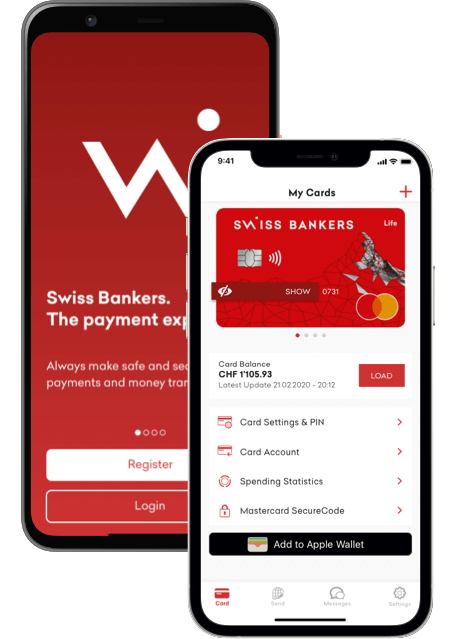


If you suspect card fraud, it’s vital to act quickly. With the Swiss Bankers app, you can keep an eye on your card transactions and block your card yourself at any time.
Here’s what to do if you notice a suspicious payment authorisation:
Block your card: Select the relevant card and, under ‘Card settings & PIN’, choose the ‘Block card’ option.
Check transactions: Check your recent card transactions for any unauthorised charges.
Contact customer service: Report the incident directly via the Swiss Bankers app or by telephone on +41 31 710 12 15. If your card details have been compromised, arrange for a replacement card.
Our tip: Activate transaction notifications to spot suspicious card activity at an early stage. You can find further helpful security settings in our article ‘Your card in everyday life: PIN, limits and notifications’.
The prepaid system offers an additional security benefit: as you generally pay using the credit you have previously topped up and without an additional credit limit, the financial risk in the event of card misuse can be limited.
Have you already noticed any unauthorised charges? In our guide “Reporting unauthorised charges: how to do it properly”, you can find out how to dispute them.
Push-bombing shows that criminals do not always need to bypass technical security measures. Sometimes, all it takes is a moment of inattention.
You should therefore take the time to carefully check the process every time you authorise a transaction, avoid letting yourself be pressured, and make use of the security features of your Swiss Bankers app.
A request is not valid simply because it appears repeatedly.

© Swiss Bankers 2026


